Most professionals already know that AI can draft an email, summarize a document, or turn rough notes into a cleaner paragraph. Those uses may save a few minutes, but they do not explain how high performers use AI at work to produce better analysis, decisions, and outcomes.
The real difference is not access to a better tool or possession of a secret prompt. It is workflow design. Strong professionals decide what AI should do, what information it may use, how the work will be divided into stages, and where human judgment must take over. They use AI to examine evidence, generate alternatives, expose weak assumptions, and accelerate intermediate steps without handing over responsibility for the result.
This guide explains the practical habits behind effective professional AI workflows. It includes real work examples, reusable prompt blocks, quality controls, and a framework for turning successful AI interactions into repeatable systems.
High performers do not hand their job to AI. They decide which part of the work AI should accelerate, which evidence it may use, how the result will be checked, and where human judgment must take over.
The Difference Between Using AI and Working With AI
High performers use AI as part of a controlled workflow. They define the task, provide relevant evidence, generate and compare alternatives, challenge the output, verify important claims, and make the final decision themselves. The advantage comes from better process design and judgment, not from asking AI to complete an entire job independently.
Basic AI use is usually transactional. A person enters a short instruction, receives an answer, makes a few edits, and moves on. That can be useful for low-risk tasks, but it leaves most of the potential value untouched. It also creates a dangerous habit: judging the result by how polished it sounds rather than by how well it supports the real objective.
Working with AI is different. The professional first defines the work product and its purpose. They identify the available evidence, missing information, constraints, risks, and decision criteria. AI is then assigned specific roles at different stages of the process.
| Basic AI Use | High-Performer AI Use |
|---|---|
| Asks for a finished answer | Defines the decision or work product first |
| Provides minimal context | Supplies relevant evidence and constraints |
| Uses one large prompt | Divides complex work into controlled stages |
| Accepts the first plausible output | Compares, challenges, and revises the output |
| Measures speed | Measures usefulness, accuracy, and reduced rework |
| Repeats prompts manually | Builds reusable workflows and templates |
| Treats AI as an authority | Treats AI as a fallible collaborator |
Simple tasks remain valuable. A professional may still use AI to shorten a message or summarize meeting notes. The difference is that these actions sit inside a larger understanding of the task. The user knows what matters, what could go wrong, and what must be checked before the output affects another person or business decision.
If you are still deciding which everyday tasks are appropriate for AI, start with How to Use AI at Work Effectively. The next step is connecting individual tasks into a controlled sequence that produces a reliable work product.
The competitive advantage is rarely a secret prompt. It is the ability to provide better context, break work into stages, recognize weak output, and turn a useful interaction into a repeatable process.
The High-Performer AI Loop
Effective AI-assisted work can be organized into an eight-stage loop. Not every task needs all eight stages, but the model prevents a common mistake: moving directly from a vague problem to a polished AI-generated answer.
- Frame: Define the task, audience, decision, constraints, and quality criteria.
- Ground: Give AI the relevant documents, data, definitions, and known limitations.
- Expand: Generate alternative approaches, questions, scenarios, and hypotheses.
- Build: Create the first analysis, outline, memo, plan, or draft.
- Challenge: Find weak assumptions, counterarguments, risks, and missing evidence.
- Verify: Check facts, calculations, names, dates, sources, and interpretations.
- Decide: Apply human judgment and choose the final action.
- Systemize: Save the successful process as a reusable workflow.
1. Frame the Work
Before prompting AI, define what must exist at the end of the process. A “market analysis” could mean a two-page executive memo, a list of competitors, a financial model, or a recommendation for entering a new region. Unless the intended work product is clear, AI will fill the ambiguity with generic assumptions.
Framing also identifies the decision connected to the deliverable. A useful analysis is not merely informative. It should help a specific person decide, prioritize, approve, reject, or investigate something.
2. Ground the AI
Grounding means giving AI the information it should use instead of expecting it to reconstruct the organization’s reality from general knowledge. This may include reports, customer feedback, project updates, policies, definitions, financial constraints, previous decisions, and examples of acceptable output.
Grounding should also define what the AI does not know. Explicitly naming missing data reduces the risk that uncertainty will be hidden behind confident language.
3. Expand the Options
AI can explore more alternatives than a busy professional might consider alone. It can generate competing explanations, possible objections, implementation routes, failure scenarios, or questions that deserve investigation.
This stage is intentionally divergent. The purpose is not to accept every idea, but to widen the field before narrowing it with evidence and judgment.
4. Build the First Work Product
Once the task and evidence are clear, AI can help produce a structured first version: an outline, comparison table, decision memo, project plan, meeting brief, risk register, or draft communication.
The output should follow an explicit structure. Asking for headings, evidence labels, decision criteria, or action owners makes the result easier to inspect than a continuous block of polished prose.
5. Challenge the Output
The same system that produced the draft can be asked to attack it. A separate review prompt can identify weak assumptions, missing stakeholders, unsupported claims, hidden costs, contradictions, and conditions under which the recommendation would fail.
This does not prove the criticism is correct. It creates a second perspective that the professional can evaluate.
6. Verify Important Claims
Claims that affect money, people, customers, deadlines, compliance, or strategy require direct verification. The reviewer should compare the output with original documents, approved data, authoritative sources, and current organizational information.
Verification is not asking another AI model whether the first answer looks right. It is checking the work against evidence.
7. Make the Decision
AI can organize trade-offs, but it does not experience the consequences of the decision. It cannot own a budget, explain a failure to a client, repair a damaged relationship, or accept accountability for an avoidable risk.
The responsible professional must choose which evidence matters, what uncertainty is acceptable, and what action fits the broader context.
8. Systemize What Worked
A useful AI interaction should not disappear inside a chat history. The professional records the required inputs, prompt sequence, output format, verification checklist, escalation conditions, and approval owner.
The resulting process can be expressed as:
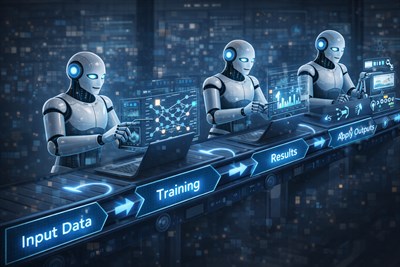
Input → AI processing → Human review → Revision → Approval → Reusable workflow
Seven Ways High Performers Actually Use AI
1. They Define the Work Before Writing the Prompt
A weak prompt usually hides an undefined task. “Write a strategy,” “analyze these results,” or “make this presentation better” leaves AI to guess the audience, purpose, constraints, and required depth.
High performers begin by defining the deliverable. They specify who will use it, what decision it should support, what information is available, what is out of scope, and how quality will be judged.
Consider the difference between these two requests:
Weak request: Write a strategy for improving customer retention.
Better request: Create a decision memo for a product leadership meeting. Compare three retention initiatives using expected impact, implementation effort, evidence quality, time to result, and major risks. Use only the supplied customer and product data.
The second request is stronger because it defines the work product and evaluation criteria. It also makes the output easier to review. A manager can inspect whether the comparison is complete instead of merely deciding whether the prose sounds intelligent.
Prompt: Before producing the deliverable, help me define the task. Identify the intended audience, decision to be made, required inputs, constraints, quality criteria, and information that is still missing. Ask only questions that could materially change the result.
2. They Give AI Evidence, Not Just Instructions
Prompt wording matters, but evidence usually matters more. An AI system cannot know the internal history of a project, the meaning of company-specific metrics, the reasons a previous proposal failed, or the constraints that leadership has already established unless that information is supplied.
A product manager, for example, might provide customer interviews, usage data, support tickets, the current roadmap, engineering capacity, and revenue priorities. The manager then asks AI to map each proposed feature to supporting evidence, affected users, likely benefits, and unresolved uncertainty.
Example: A product manager does not ask AI, “What should we build next?” The manager supplies customer interviews, usage data, and current business constraints, then asks AI to map each proposed feature to evidence, affected users, expected impact, and unresolved uncertainty.
This use of AI is more disciplined than requesting an answer from general model knowledge. It also makes hallucinations easier to detect because every meaningful conclusion should point back to supplied evidence.
Prompt: Analyze only the source material provided. Separate direct evidence, reasonable inference, and unsupported assumption. For every recommendation, show which evidence supports it and identify any information that would be required before acting.
3. They Break Complex Work Into Stages
One enormous prompt may produce an impressive response, but it makes the reasoning difficult to inspect. If AI extracts facts, interprets them, chooses a recommendation, and writes the final communication in one step, the user may not notice where an error entered the process.
High performers decompose complex work. A typical sequence might be:
- Extract facts from the source material.
- Identify contradictions and missing information.
- Generate possible approaches.
- Compare the approaches using defined criteria.
- Create a first draft.
- Critique the draft.
- Revise the work.
- Complete human verification and approval.
Imagine an executive presentation. Instead of asking AI to create ten slides immediately, the professional first extracts the decisions, metrics, risks, and unresolved questions. AI then proposes several possible narratives. The user selects one, creates an outline, checks the logic, and only then develops the slide content.
This staged approach may involve more prompts, but it reduces hidden errors and makes human intervention possible before a weak assumption contaminates the final deliverable.
Prompt: Break this task into distinct stages. For each stage, define the input, expected output, main risk, and human review required. Do not complete the task yet.
4. They Use AI to Expand Thinking Before Narrowing It
Professionals often approach a problem with an early preference. Time pressure then encourages them to search for evidence that supports the first plausible option. AI can help interrupt that pattern by producing genuinely different alternatives.
The value is not the number of ideas. It is the ability to examine different underlying assumptions. One approach may prioritize speed, another risk reduction, another customer value, and another long-term flexibility.
After expansion, the professional narrows the options using evidence, constraints, and responsibility for the consequences. AI generates possibilities; the human decides which possibilities deserve serious consideration.
Prompt: Generate five meaningfully different approaches to this problem. Do not produce minor variations of the same idea. For each approach, explain the underlying assumption, likely advantage, main risk, and situation in which it would be the wrong choice.
5. They Ask AI to Challenge the Work
Many users ask AI to improve a draft, which usually produces cleaner language and stronger confidence. High performers also ask it to disagree.
A challenge prompt can simulate a skeptical executive, cautious customer, compliance reviewer, budget owner, competitor, or implementation team. It can search for missing evidence, second-order effects, optimistic estimates, and contradictions between the recommendation and the source material.
Example: A consultant drafts a recommendation to consolidate two operational teams. Before presenting it, the consultant asks AI to identify transition costs, service risks, incentive conflicts, and evidence that might support keeping the teams separate.
The purpose is not to let AI overrule the author. It is to reveal questions that should be resolved before another person raises them in a higher-stakes setting.
Prompt: Act as a skeptical reviewer who is not rewarded for agreeing with this draft. Identify the three weakest assumptions, the strongest counterargument, any evidence being overstated, and the most likely way this recommendation could fail.
6. They Turn Successful Prompts Into Repeatable Workflows
A good result from one prompt is useful. A process that produces reliable results every week is more valuable.
High performers document successful interactions. They separate fixed instructions from variable inputs, define a standard output format, add a verification checklist, and specify what should happen when information is incomplete or the result falls outside acceptable limits.
A repeatable workflow should include:
- the event that starts the process;
- required and optional inputs;
- approved information sources;
- the sequence of AI-assisted steps;
- the expected output format;
- human review criteria;
- conditions requiring escalation;
- the person responsible for final approval.
Managers who want to connect preparation, analysis, communication, and follow-up can use the structure described in the End-to-End AI Workflow for Managers and Team Leads.
A reusable AI workflow should define more than a prompt. It should specify required inputs, acceptable sources, output structure, review criteria, escalation rules, and the person responsible for approval.
7. They Keep Decision Rights Human
AI can summarize, classify, compare, calculate, draft, simulate objections, and identify patterns. These capabilities can materially improve professional work. They do not transfer ownership of the decision.
A model cannot determine what level of risk the organization should accept, which relationship deserves protection, whether an exception is fair, or when incomplete evidence is sufficient for action. These judgments depend on values, authority, consequences, and context that cannot be reduced to text generation.
This is especially important in decisions involving hiring, dismissal, promotion, compensation, legal commitments, safety, personal data, customer eligibility, medical information, or significant financial exposure.
Human oversight should be proportional to the risk. A low-stakes internal summary may need a quick review. A recommendation affecting employees or customers requires qualified review, documented reasoning, and clear accountability.
Five Real AI Workflow Examples
Example 1: A Manager Preparing a Decision Memo
A manager must recommend whether to continue, reduce, or cancel a delayed project. The available material includes project updates, spending data, delivery estimates, customer commitments, risk logs, and team capacity.
The manager first asks AI to extract verifiable facts and label disagreements between the source documents. AI then creates a comparison of three options using cost, timing, customer impact, strategic value, and execution risk.
After reviewing the comparison, the manager requests a decision memo. A separate challenge prompt tests the preferred option against failure scenarios and stakeholder objections.
Workflow: Source documents → fact extraction → option comparison → draft decision memo → red-team review → manager verification → final recommendation.
The manager verifies every number, deadline, and contractual claim. They also add context that may not appear in the documents, such as the reliability of a supplier or the consequences of losing a specific customer. AI accelerates preparation, but the manager owns the recommendation.
Example 2: An Analyst Reviewing a Large Information Set
An analyst receives hundreds of survey responses, interview transcripts, product notes, and support requests. Reading the material manually remains important, but AI can help create an initial map of the information.
The analyst asks AI to group recurring themes, preserve representative evidence, identify contradictions, and distinguish frequently mentioned issues from issues with high business impact. The model is instructed not to treat frequency as importance.
The analyst reviews the classifications, merges or separates weak categories, and checks every important conclusion against the original material. They then produce a report showing evidence strength, affected user groups, and unresolved questions.
The risk is false structure. AI may group statements that use similar language but describe different problems. The analyst’s domain knowledge is necessary to decide whether the categories are meaningful.
Example 3: A Team Lead Preparing for a Difficult Meeting
A team lead must discuss repeated missed deadlines with another department. The issue includes conflicting accounts, unclear ownership, and growing frustration.
The lead gives AI a neutral timeline of events, current responsibilities, agreed deadlines, and unresolved dependencies. AI identifies disputed points, missing facts, and questions that could move the meeting toward a decision.
The lead then asks for several possible reactions from the other department and prepares responses that are firm without becoming accusatory. AI also helps create an agenda focused on evidence, ownership, and next actions.
The human remains responsible for tone, relationship management, confidentiality, and what should not be said. AI can simulate a conversation, but it cannot accurately model every interpersonal or political consequence.
Example 4: A Professional Improving an Important Draft
An important proposal should not move directly from a blank page to “make this sound professional.” A stronger workflow begins with purpose, audience, evidence, and desired action.
The professional uses AI to test the outline, identify missing claims, and compare several structures. After selecting the strongest structure, they create a first draft and ask AI to mark unsupported claims, vague language, unnecessary repetition, and sections that do not help the reader decide.
A final prompt adapts the draft for the intended audience without changing the underlying recommendation. The author then completes a line-by-line edit.
The risk is over-polishing. Repeated AI revisions can remove nuance, weaken the author’s voice, and replace precise language with familiar business clichés. The final human edit should restore specificity and ownership.
Example 5: A Manager Turning a Weekly Task Into a System
A manager spends several hours every Friday collecting project updates from multiple owners. The updates use different formats, omit key information, and often hide unresolved dependencies.
The manager creates a standard input template covering progress, blockers, decisions needed, owner, deadline, and confidence level. AI normalizes the submissions, compares them with the previous week, flags missing owners and dates, and drafts questions for the review meeting.
After the meeting, AI can help convert verified decisions into a concise summary. The manager checks every commitment, owner, deadline, and escalation before distribution.
Result: The value does not come from generating a faster status update. It comes from creating a consistent review process that surfaces missing owners, delayed decisions, conflicting information, and unresolved dependencies every week.
A Prompt Stack for High-Quality Work
A prompt stack is a sequence of specialized prompts used at different stages of a task. It is more controllable than one universal prompt because each output can be inspected before it becomes the input for the next step.
Step 1: Frame
Frame: Restate the problem as a decision or deliverable. Define the audience, purpose, constraints, success criteria, and missing information. Do not solve the problem yet.
Step 2: Analyze
Analyze: Examine the supplied information. Separate facts, interpretations, assumptions, and unknowns. Identify contradictions and evidence gaps before recommending action.
Step 3: Generate Options
Generate: Create three genuinely different options. For each, show benefits, costs, dependencies, risks, and the evidence that would strengthen or weaken the option.
Step 4: Challenge
Challenge: Review the preferred option from the perspective of a skeptical stakeholder. Identify failure modes, second-order effects, and assumptions that require validation.
Step 5: Produce
Produce: Create the final deliverable in the required format. Use only verified claims, clearly label remaining uncertainty, and include the decisions or actions required from the reader.
Step 6: Verify
Verify: Create a verification checklist for this deliverable. List every factual claim, calculation, source, date, name, and assumption that a human should check before the work is used.
The prompts should not be treated as a rigid script. A low-risk task may need only framing, production, and review. A high-impact decision may require several rounds of evidence analysis, challenge, and verification.
How to Build Your Own High-Performance AI Workflow
Choose a Recurring Task
Start with work that happens regularly and has recognizable inputs and outputs. Good candidates include weekly reporting, meeting preparation, research synthesis, document review, proposal drafting, project intake, or customer feedback analysis.
A suitable task should be important enough to justify improvement but structured enough to evaluate. Avoid beginning with a rare, politically sensitive, or irreversible decision.
Map the Current Process
Document how the work is completed now. Identify the trigger, required information, actions, decisions, output, reviewer, and common failure points.
This often reveals that the task is not one action but a chain of smaller activities. Some require judgment, while others involve extracting, reorganizing, comparing, or formatting information.
Mark AI-Appropriate Steps
AI is often useful for:
- extracting facts from consistent documents;
- classifying or grouping information;
- comparing options against defined criteria;
- transforming one format into another;
- generating questions and alternatives;
- creating a structured first draft;
- reviewing work for omissions or contradictions.
AI is less suitable when the step depends on implicit relationships, sensitive judgment, physical observation, authority, or responsibility for consequences.
Add Human Checkpoints
Define where a qualified person must intervene. Checkpoints may include approval of source material, verification of facts and calculations, review of legal or policy implications, evaluation of sensitive communication, and final acceptance of the recommendation.
The workflow should also define what happens when confidence is low, sources conflict, required information is missing, or the output falls outside expected limits.
Measure the Result
Do not measure only how quickly AI produces text. Track whether the workflow reduces rework, prevents missed issues, improves consistency, shortens decision cycles, and creates more useful outputs for stakeholders.
Possible metrics include:
- time spent on the full process;
- number of corrections after review;
- frequency of factual errors;
- amount of repeated work;
- missed deadlines or dependencies;
- stakeholder satisfaction with the output;
- number of cases requiring escalation;
- quality of the final decision or deliverable.
Do not call a workflow successful only because it produces output faster. Track whether it reduces rework, preserves accuracy, surfaces better questions, and creates a more useful final decision or deliverable.
Limits and Risks of High-Intensity AI Use
Hallucinations and Unsupported Certainty
AI can produce incorrect statements that are specific, coherent, and confidently written. It may invent sources, misstate dates, combine separate events, attribute claims to the wrong person, or turn a weak correlation into a causal explanation.
The risk grows when the user requests a complete answer without providing evidence. It also grows when the reviewer is unfamiliar with the subject and cannot recognize a plausible error.
Important claims must be checked against original documents, approved data, or authoritative external sources. Another AI response is not independent verification.
Confidential and Regulated Information
Professionals should not enter sensitive information into an AI tool merely because doing so is convenient. The acceptable use of data depends on the organization’s policies, contractual obligations, tool configuration, security controls, and applicable law.
Potentially sensitive material includes personal data, customer records, passwords, contracts, medical information, non-public financial data, internal strategy, privileged legal material, proprietary source code, and confidential employee information.
When the policy is unclear, remove identifying details, use approved systems, or obtain guidance before submitting the material.
Automation Bias
Automation bias occurs when people give excessive weight to a system’s output because it appears structured, objective, or technologically sophisticated.
A clear table can still contain incorrect assumptions. A balanced-looking comparison can still omit the most important option. A confident recommendation can still be based on incomplete evidence.
Warning signs include accepting the first answer, reviewing only grammar, failing to inspect assumptions, and treating an AI-generated ranking as an objective decision.
Context Compression
Workplace decisions often depend on information that is difficult to include in a prompt: informal commitments, organizational history, trust, political constraints, stakeholder expectations, and unusual exceptions.
AI may compress this complexity into categories that appear cleaner than reality. The resulting answer can be logically consistent while remaining practically wrong.
Professionals should treat AI output as a representation of the context supplied, not as a complete representation of the organization.
Skill Erosion
Repeatedly delegating a skill may reduce opportunities to practice it. This does not mean AI inevitably weakens professional ability. The risk depends on how the tool is used.
Using AI to critique an independently developed argument may strengthen reasoning. Asking AI to produce every argument before the user has examined the evidence may weaken it.
Important skills should remain observable. Professionals should be able to explain the logic behind a decision, recognize weak output, and complete selected tasks without AI when necessary.
Faster Low-Quality Work
AI makes it easy to produce more reports, messages, proposals, summaries, and presentations. The organization may become more productive on paper while employees spend more time reading unnecessary material.
Before optimizing a workflow, ask whether the output should exist. A faster process for producing a document nobody uses is not a high-performance system.
The purpose of AI at work is not to maximize the amount of generated content. It is to improve a real decision, action, service, or outcome.
AI Can Accelerate the Work, but It Cannot Own the Outcome
AI can help professionals move through information faster, explore more alternatives, prepare stronger drafts, and identify questions they may have missed. These advantages are real, but they do not remove human responsibility.
The person using the output still chooses the objective, defines acceptable evidence, evaluates uncertainty, and decides which trade-offs the organization should accept. That person must also consider consequences that are not visible in the prompt.
High performers are not defined by how much work they hand to AI. They are defined by how deliberately they divide the work, how rigorously they check it, and how responsibly they act on the result.
Choose one recurring task this week. Map its inputs, decisions, and review points. Then test where AI can improve the workflow without taking control of the outcome.
FAQ
How do high performers use AI at work?
High performers use AI at multiple controlled stages of a task. They may use it to organize evidence, generate alternatives, prepare a first draft, test assumptions, and identify missing information. They do not automatically accept the result. Important facts are checked against original sources, and final decisions remain with the person responsible for the work.
What tasks should professionals use AI for?
AI is most useful for structured activities such as extracting information, comparing documents, classifying inputs, generating options, creating drafts, and reviewing work for gaps. The task should have clear inputs, an identifiable output, and a practical way for a qualified person to check the result before it is used.
How can I use AI more effectively at work?
Start by defining the deliverable, audience, constraints, and success criteria. Give AI relevant source material instead of relying only on general model knowledge. Divide complex work into stages, request alternatives, challenge the output, and verify important claims. When a process works, save the inputs, prompt sequence, and review checklist as a reusable workflow.
Can AI make employees more productive?
AI can reduce time spent on information processing, drafting, and routine transformation tasks. However, faster production does not automatically mean better performance. Productivity should be evaluated through useful outcomes, accuracy, reduced rework, better decisions, and consistent quality, not simply through the number of documents or messages generated.
How do managers use AI at work?
Managers can use AI to prepare meetings, consolidate updates, compare options, identify unresolved dependencies, draft decision memos, and test recommendations against possible objections. Sensitive personnel decisions, risk acceptance, strategic trade-offs, and final communication still require managerial judgment and accountability.
How do you create a repeatable AI workflow?
Document the trigger, required inputs, AI-assisted steps, expected output, verification rules, and final approver. Separate fixed instructions from information that changes each time. Test the process on several real cases, record recurring errors, and update the workflow until another qualified person can follow it consistently.
How can professionals avoid becoming dependent on AI?
Use AI to extend analysis rather than replace understanding. Keep important domain skills active, review source material directly, explain the reasoning behind final decisions, and periodically complete selected tasks without AI. Dependence becomes risky when a person can no longer recognize incorrect output or reconstruct how a conclusion was reached.
What information should not be entered into an AI tool?
Do not submit confidential, regulated, or personally identifiable information unless the tool and intended use have been explicitly approved by the organization. This may include customer records, passwords, contracts, medical data, non-public financial information, private source code, legal material, and internal strategy.